
Contractor invoices and employee timesheets,
one complete picture.
A complete view of your labour costs — whether that labour is invoiced by self-employed contractors or paid through your own payroll. Contractors raise invoices against the jobs they were assigned; your staff log hours as the work happens. Everything is checked, approved and recorded against real tasks, so your figures always reflect what actually happened on site.
Keep on top of what your contractors charge — all in one place.
When you work with self-employed contractors or subcontractors, every completed job needs to be priced, checked and paid. Each contractor raises an invoice for the work they've done, against the specific jobs they were assigned — no more chasing paper, spreadsheets or WhatsApp messages.
Contractor invoice
Splitting invoices
Divide one body of work across more than one invoice — each with its own totals and approval. Ideal for staged payments, part-completed jobs, or shared cost centres.
Moving tasks between invoices
Pull a task off one invoice and place it on another — totals recalculate automatically, so the figures always reflect what's actually on each invoice. No stranded charges.
Retention
Withhold an agreed percentage or fixed amount until work is signed off or the defects period passes — clearly recorded, visible to both sides, released when you're satisfied.
Deductions
Take agreed amounts off — materials supplied, advances, sub-hire — so the final payable figure is right, with a full breakdown of how the total was reached rather than an unexplained reduction.
Because deductions and retention are tied to the work on the invoice, the totals always stay accurate — even when tasks are later split out or moved to another invoice, the figures recalculate so nothing is double-counted or left stranded. Once approved, the figures flow straight through to your accounts.
Accurate hours, captured as the work happens.
For your directly employed staff, timesheets record the hours worked across jobs, sites and tasks — without the guesswork. Employees log their time as they go, so you get a true reflection of where hours are being spent rather than a rough estimate scribbled down on a Friday afternoon.
Weekly timesheet
Reviewed before they're finalised
Managers review and approve timesheets before they're locked, making sure hours are correct and accounted for against the right jobs — giving you reliable figures for payroll.
True labour cost per job
Because hours are tied to actual jobs and tasks, you get more than a payroll number — you understand the true labour cost of each job and can spot where time is over- or under-running.
Same approval process. Real PDFs at the end of it.
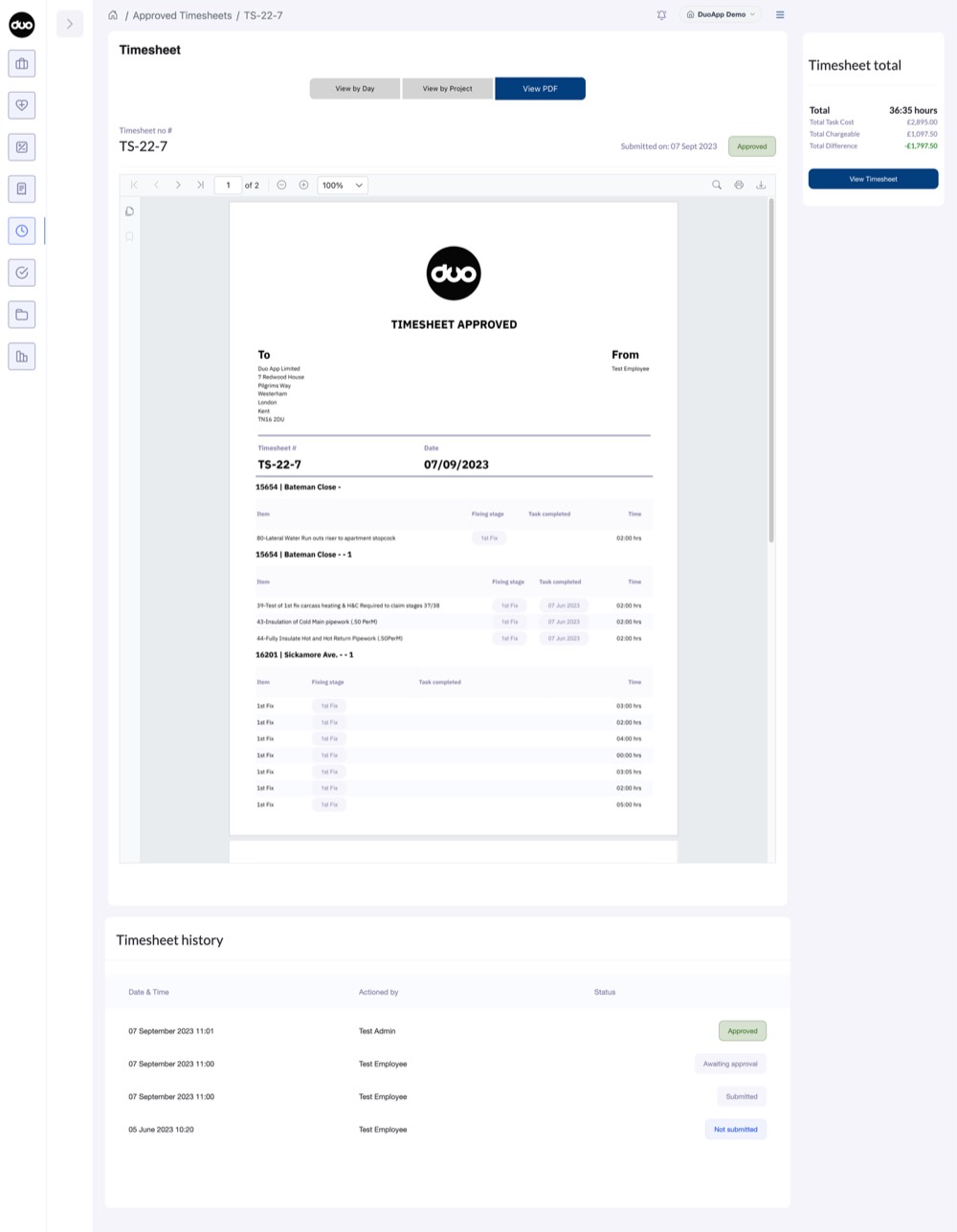
Contractor invoices and employee timesheets both run through the same four-stage approval flow — not submitted, awaiting approval, approved, then paid. Whoever's responsible checks the detail and signs it off, and the moment it's approved DuoApp generates a proper, branded PDF document — not just a status change on screen.
Not submitted
The invoice or timesheet is still being built — lines and hours added against the jobs they belong to.
Awaiting approval
Submitted and sitting in the approver's queue, with every line and hour visible for review.
Approved
The approver checks the figures and signs off — the same controls, whether it's an invoice or a timesheet. A branded PDF is generated automatically.
Paid
Marked paid once settled, closing the loop — with a full history of who actioned what, and when.
Everything you pay out, and everything you pay through payroll.
Contractor Invoices
Handle what you pay out to self-employed people who bill you for completed work — with the flexibility to split invoices, move tasks, hold retention and apply deductions as real-world jobs demand. Review, approve, query, and pay with confidence.
Employee Timesheets
Capture the hours worked by people on your payroll, against real jobs and tasks, ready for wages. Reviewed and approved by managers, so the figures you take to payroll are accurate and accountable.
Together they give you a single, accurate view of your labour costs across your whole workforce — invoiced or paid through payroll — with fewer disputes, faster sign-off, and a clear audit trail of who did what, when, and what it cost.
See your labour costs in one place.
Walk through contractor invoicing — splits, retention, deductions — and employee timesheets on a real project. Bring a recent invoice and we'll model it live.